I'm a marketer, not a developer, and a bit less than 2 years ago I didn't know how to set up a coding environment. Today almost all my work happens in a terminal, with AI agents and a few small tools I built around them.
Before I start, there are 2 simple things you need to know. An agent is an AI that doesn't only answer: it opens files, runs commands and uses tools on my Mac, step by step, until the job is done. And when I say I built something, I mean I said what I wanted and agents wrote the code, because I don't write code myself.
This is the long version of my stack page. I go through all of it, from a client call to the work getting shipped, with what works and what doesn't. For each piece, I try to explain how it works and why I do it this way. It changes every month, so take it as a photo of where I am right now.
The short version
- Everything I do lives in folders on my Mac, as plain text files
- I work in a terminal, with Claude Code and Codex
- One agent builds, and it asks the other one to review its work
- Some clients give me their own AI subscriptions, and a script picks the right account for the folder I'm in
- The agents can read my marketing tools: Search Console, Analytics, Google Ads, HubSpot, Notion, my calls
- After a call, one command files everything in the client's folder
- I dictate when typing would slow me down, and most of my feedback is a screenshot
- I don't use AI to write, or to decide
Everything is a folder
All my work sits in 2 folders on my Mac, clients and projects. There is one folder per client and one per project, and inside, it's almost all plain text files.
I use plain text because an agent can open, read and change a text file directly, with nothing in between. A document locked inside an app is something the agent has to ask for, through a connection that may or may not work that day.
This is what a client folder looks like:
raw and exports, my baseline
If I had to keep one folder, it would be raw. That's where things land exactly as they came in: an export from Google Ads, a CSV from the CRM, the summary of a call. Nobody edits those files, not me and not an agent. An agent saves there what it pulls from a tool, and I drop in what people send me.
I'm that strict because an agent can write a wrong number with a lot of confidence. If the original is untouched, I can always put the 2 side by side. And every analysis I write names the export it was built from. So when I give a number to a client, I can walk back from my message to the analysis, and from the analysis to the file the tool gave me.
A chain of 4 steps, top to bottom. First raw/exports: what the tool gave me, never edited. Then docs: my analysis, which points at the export. Then the decision, written down in PROJECT_STATE.md. Then what goes out: a message, a report, a change.
The todo, and who keeps it up to date
An agent remembers nothing from one session to the next. A model only knows what is in the conversation in front of it, and a new session starts empty. So if something matters, it has to be written in a file: the chat is temporary, and the files are what stays.
That's what the first 4 files of the folder are for. CLAUDE.md and AGENTS.md are the rules of the house. Claude Code and Codex are built to load their rules file by themselves every time a session starts in a folder, so I never have to paste it. My rules say where the todo and the state file are, and they say this: at the end of any session where something changed, update both, without being asked. There are 2 rules files because each tool only looks for its own, which is a bit annoying.
So I'm not the one keeping the todo up to date, the agents are. And the next agent, which knows nothing, has one place to look to see where things stand. This is a real one, with the text covered because it's full of client work:
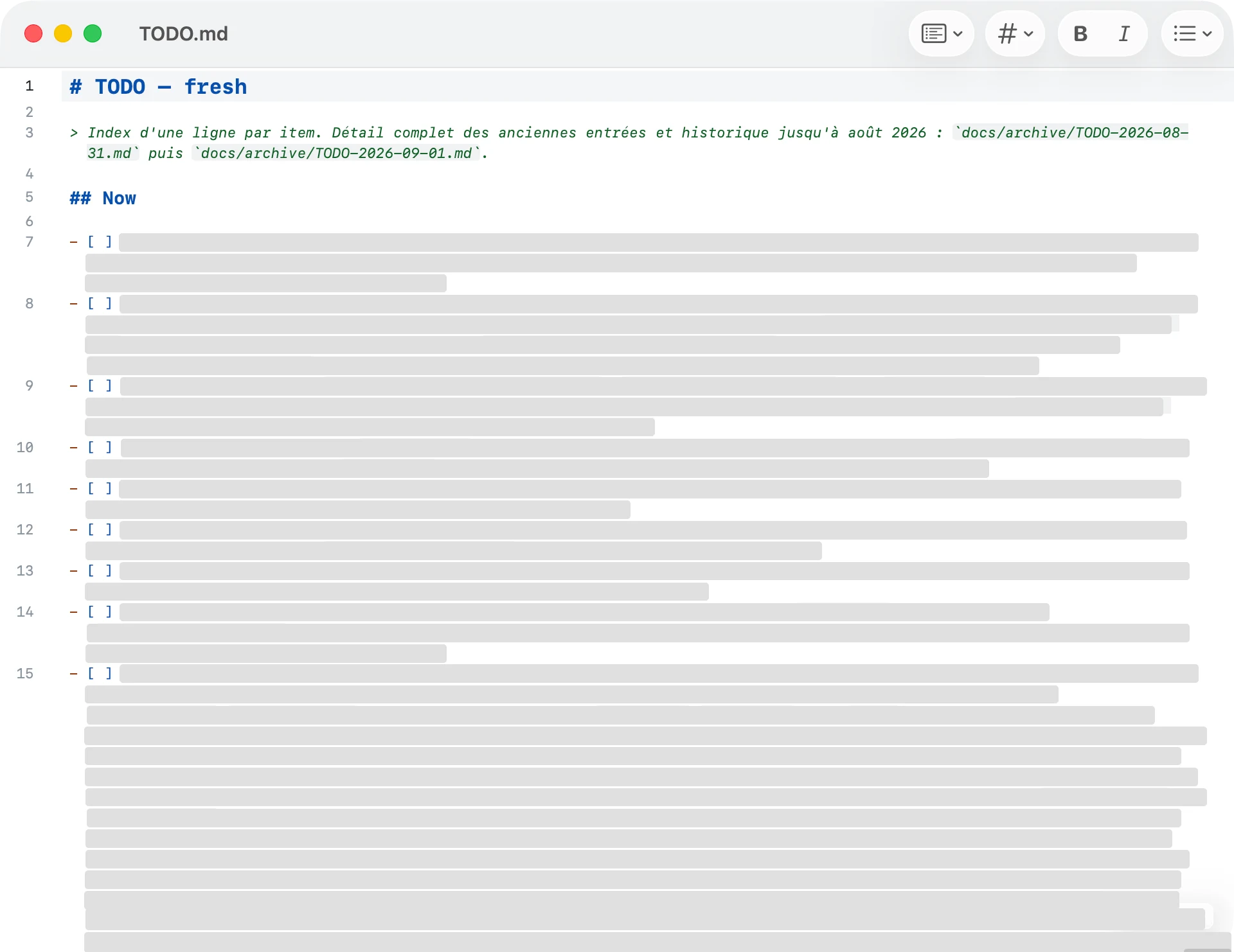
And the same shape with made-up content, so you can read it:
The shape is always the same: now, next, blocked, done, and a proof for what's done. The agent ticks the boxes. The proof is there so that done means something I can open and check. It's as simple as that!
Why git and GitHub
Each folder is saved with git and pushed to a private GitHub repository. Git is a tool that records the history of a folder, and GitHub is a website that keeps a copy of that history. I don't do that by hand: every time an agent finishes something, it saves the change itself, with one line saying what it did.
That's where I discovered why developers use it, especially when several of them work on one project at the same time. Git gives you something insane when several people, or several agents, touch the same files: versioning and reconstruction.
Versioning means every change is kept as its own version, with who made it, when, and a line saying why, so nothing overwrites anything. Reconstruction means I can rebuild the folder exactly as it was at any of those points. If an agent rewrites a document badly on Tuesday, I can see line by line what it changed, and take back Monday's version of that one file without losing the rest of Tuesday's work.
And because a full copy lives on GitHub, I can switch laptops without losing anything. From my phone I can read any file in the GitHub app, and on my own projects I can follow and answer a running agent, because Claude Code and Codex both have a remote mode for that.
That's the theory, because in practice work piles up on my laptop without being sent, which is why I had a command made for it (see cleaning up, below).
Notion is only for what I share with a team. That's where my clients' teams work, so that's where shared documents go.
One terminal, a lot of tabs
Claude Code and Codex are programs that run in a terminal, the window where you type commands instead of clicking. So that's where I spend my day, and the terminal I use is Ghostty.
On a normal day I have around 9 tabs open, one per project.
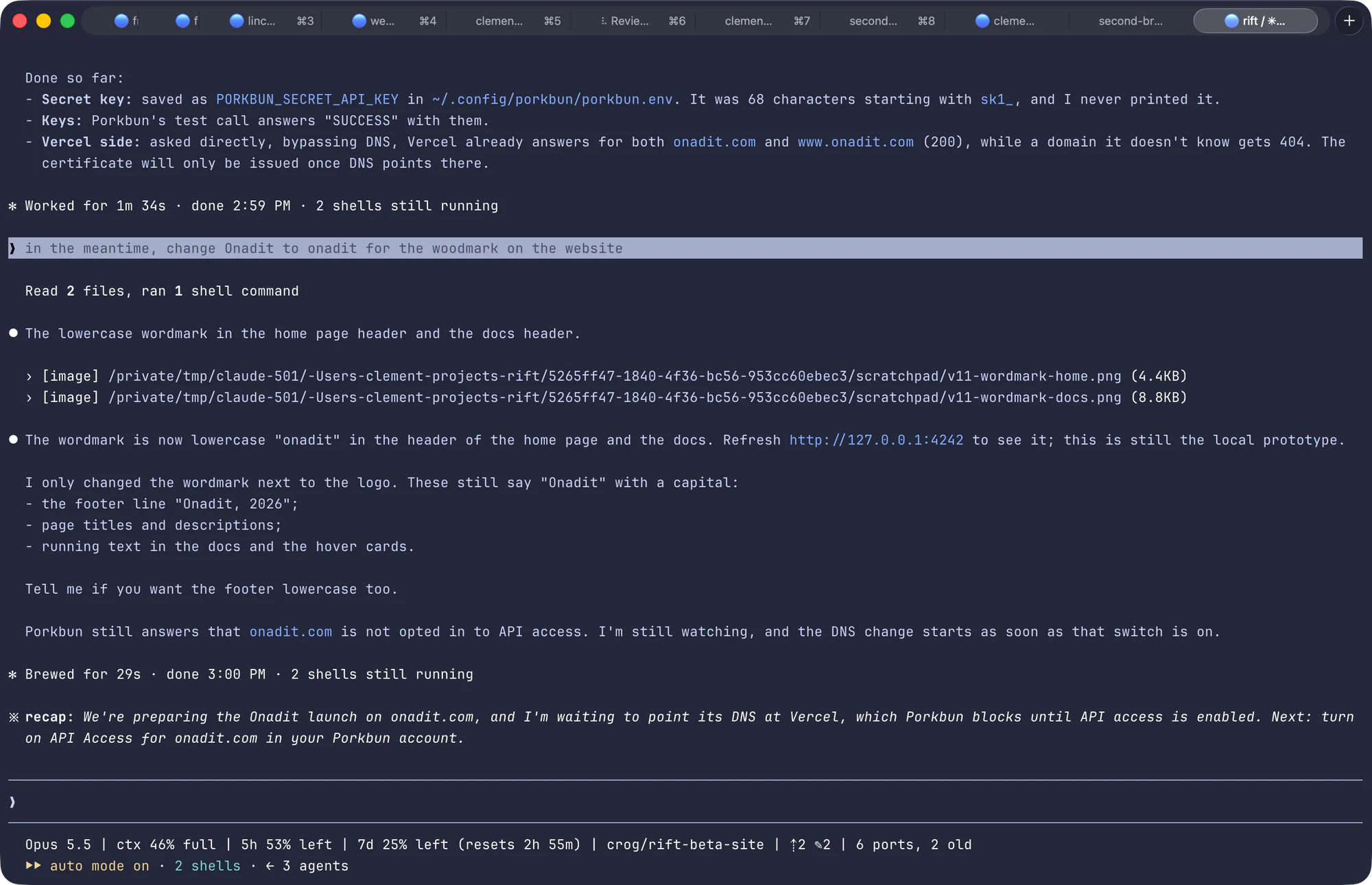
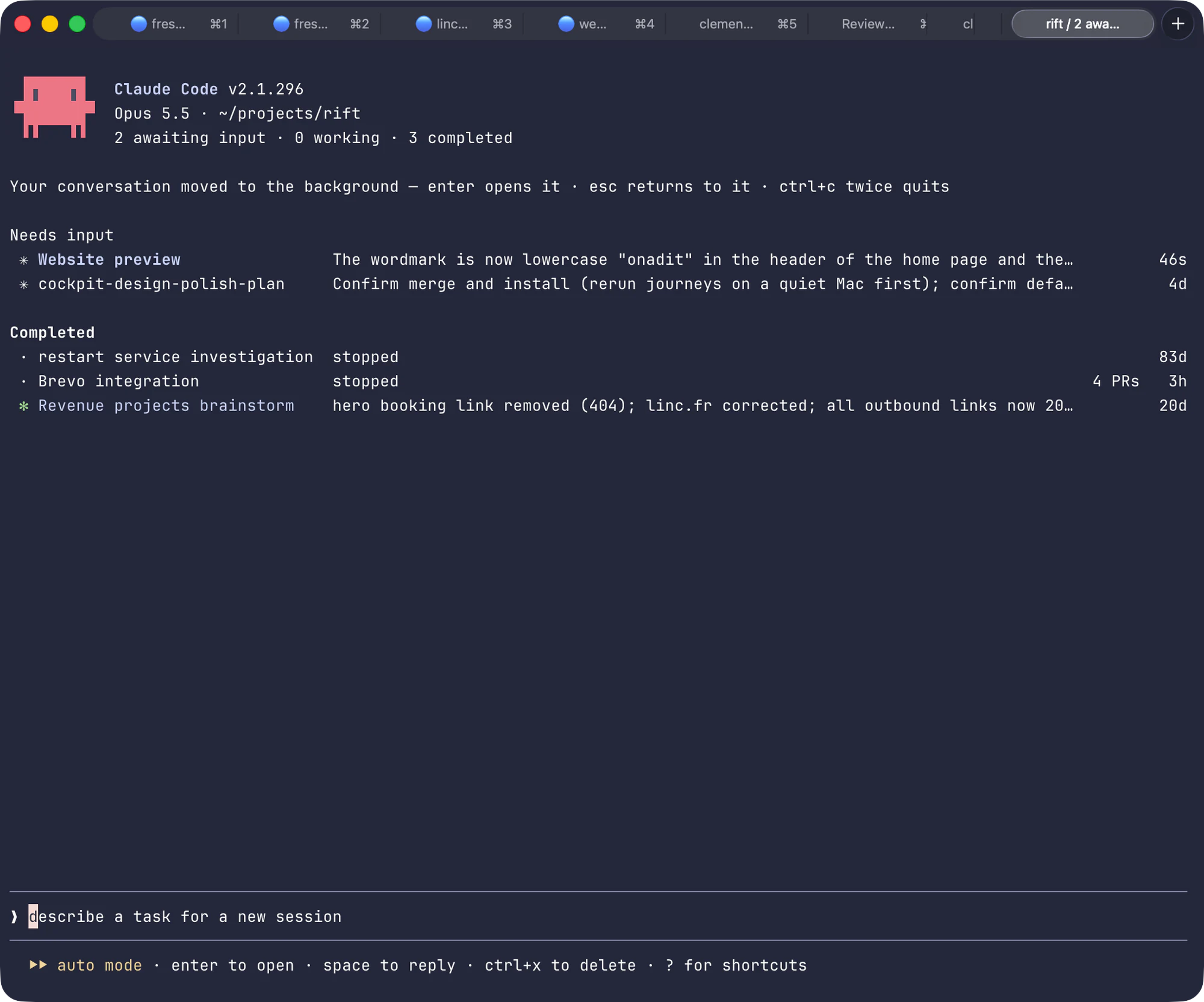
I have that many because an agent can work on its own for several minutes, sometimes much longer, and while one works I'm in another tab on another project. Claude Code even keeps its own list of the conversations still running, and tells me which ones are waiting for me, which is super handy.
Many tabs are split in 2, with Claude Code on one side and Codex on the other.
I use 2 agents because they come from 2 different companies: Claude Code is made by Anthropic and Codex by OpenAI. They were trained differently, so they don't make the same mistakes. One builds, and the other reviews what was built, a bit like a CTO would. Most of the time Claude builds and Codex reviews.
For months I was the cable between them. I copied the answer of one and pasted it into the other.
Now I mostly do it another way. The agent I'm working with calls the other one itself, in the background. It runs it as a single command, in a mode where the reviewer can read every file and change none. It reads the verdict, fixes what really blocks, and comes back to me. I only step in at the end, to try the result myself. It's super helpful, and the details are in my way to software engineering.
I recently looked at the newer apps made to run many agents side by side: cmux, Conductor and Agent Deck. I wanted one because with 9 tabs I lose track of which agent is waiting for me. I guess most of them are really good. But I love Ghostty, because it's keyboard-first, the whole configuration is one text file and it's fast, so I stayed.
One account per client
For security, and for token consumption reasons too, some of my clients give me their own Claude and OpenAI subscriptions. Security, because their documents only pass through an account they own. Consumption, because AI usage is metered, so their work counts against their plan and not mine.
That means several logins on one Mac, and picking the wrong one by hand was only a matter of time. So I wrote a script that picks the right account automatically, and it works like this: when I type claude or codex, my script runs first. It looks at the folder I'm in and checks it against a short list that says which folder belongs to which account. Each account has its own settings folder, with its own login. The script points the tool at the right one, then starts it.
Every launch prints one line, so I can check before anything happens:
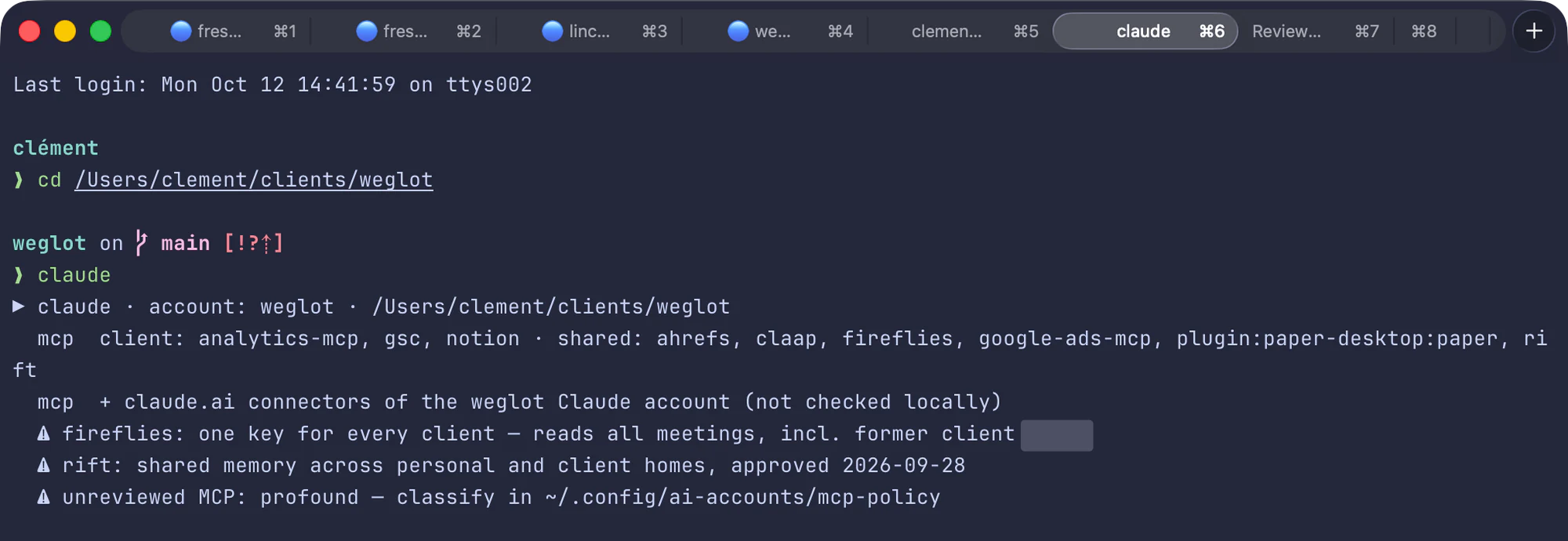
If I open a client folder that isn't on the list, the agent refuses to start. I'd rather have that than a client's work going through my personal account by mistake.
On the left, 4 folders: clients/acme, clients/zenith, projects, and clients/new-one drawn with a dashed line. They all lead to a script in the middle that reads the folder. On the right, what the script starts: Acme's accounts, Zenith's accounts, my own accounts, and for the unknown folder, won't start.
The same script also checks the connectors before the agent starts (more on those just below). It reads which ones are switched on for that account, and if one is named after another client, it blocks. When a mission ends, the client goes on a retired list, and everything named after them stays blocked. And at every launch it reminds me of the 2 things I chose to share across clients: my call transcripts and my memory.
What the agents can reach
An agent on its own can only read files and run commands. To read my marketing tools it needs connectors. A connector is a small program that sits between the agent and a tool, say HubSpot. It tells the agent what it can do there (search contacts, read a deal), and when the agent asks, it does it with my login. The standard behind this is called MCP.
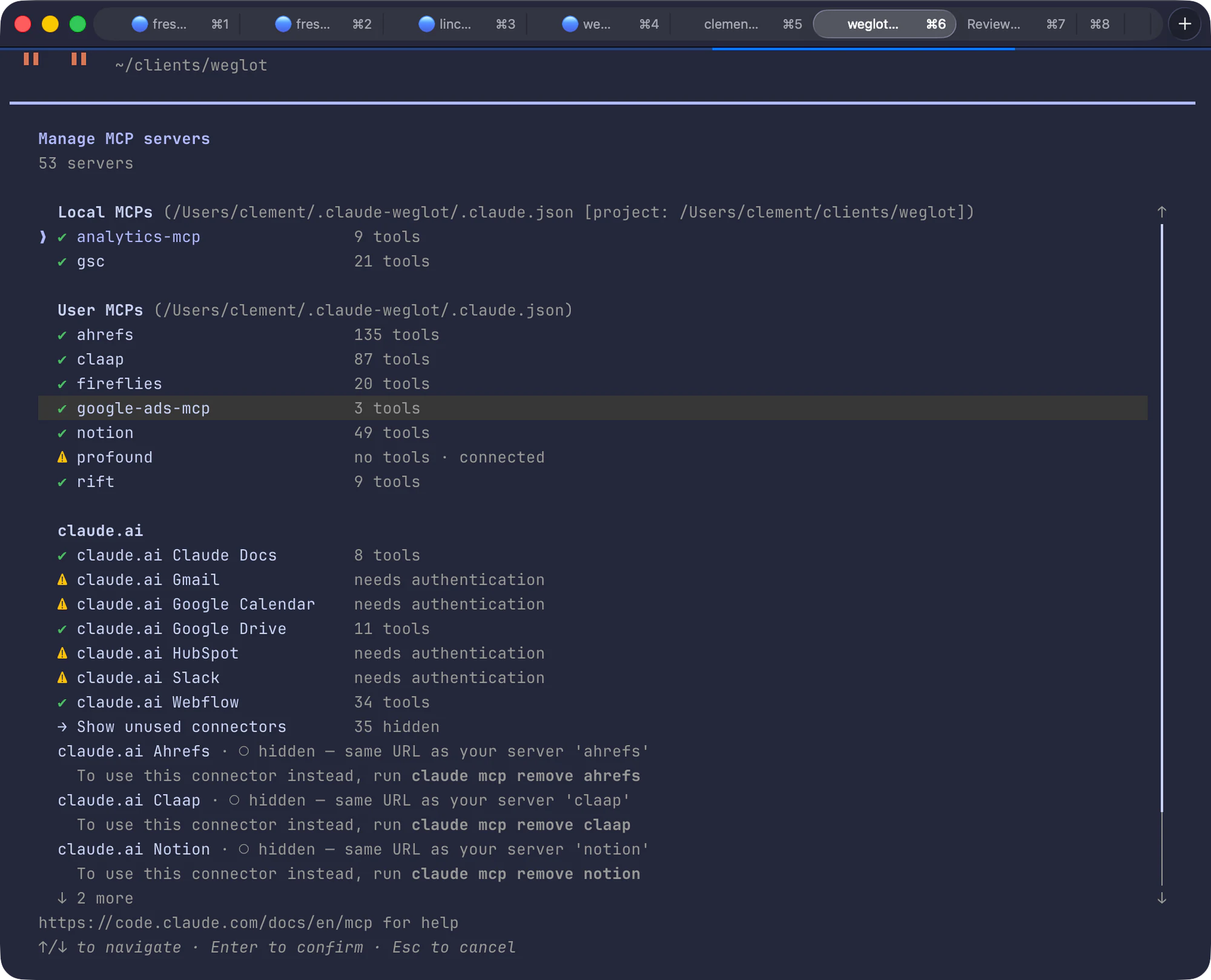
The insanely good thing is that the connectors follow the account. In a client's folder, the agent is on that client's Notion, their Search Console and their Analytics. Their Slack comes with their Claude account. I never pick, and the agent can't end up in another client's workspace by mistake.
So when I ask for an SEO audit or a review of an ads account, the agent pulls the real numbers itself and writes the analysis in the same place. I don't export, paste and explain anymore, and I don't miss it. For example:
- Which pages lost clicks since last month, and what changed on them
- Which search terms cost money in Google Ads without bringing a single lead
- Pull the last 3 calls with this prospect and tell me what we promised
It's a big part of why I believe close to 100% of marketing can be solved by code. When I say that, I mean the doing: pulling the numbers, building the page, setting up the campaign, checking the tracking. Not the judgment about what to do, and not the words. Those stay with me, see further down.
I learned 3 things the slow way.
The first one is that fewer connectors is better. When a session starts, every connector that is switched on hands the agent its full list of what it can do. Ahrefs alone comes with 135 actions, as you can see above. All those lists take up room in the conversation, and that room is limited. It's the same space the agent uses to think about my actual problem. In that account they add up to close to 400. In my experience, with everything on, the agent gets slower and picks the wrong action more often. So each account only has the connectors its work needs. In a client's folder, that means the tools of that client and my call transcripts.
The second one is that they break in boring ways. Ahrefs refused to give keyword volumes on my plan, so I went back to the website for those. The Framer one couldn't set borders reliably and froze when I opened a second editor tab. I stopped using the Framer and Webflow ones.
The third one is that the official connector is sometimes too thin. The Gmail connector was too limited for me, so I built my own mail client, Juby, with a door for agents: a few commands they can use on my mailbox. They can search, read and prepare a draft. They also send, but only my personal mail for now.
Calls
Fireflies joins my calls, records them and writes the transcript, and a second tool now listens too: Turn, a small Mac app I built because I wanted help during the call and not only a transcript after it.
It works in 2 steps, one before the call and one during it. Before a call that matters, an agent reads the client's folder and prepares a brief, where every fact points to the file and the line it comes from. During the call, Turn listens to my microphone and to the meeting, and turns the speech into text on my Mac, so the audio never leaves it. When I press a shortcut, it sends the last exchanges and the brief to Claude, and shows a short card: the answer, where it comes from, and a question worth asking next. It's most useful for the things I can't check in the middle of a call, like a number. Turn goes and looks in the client's data while I keep talking. Nothing shows up unless I press, because a screen that moves while I'm talking to someone is the last thing I want.
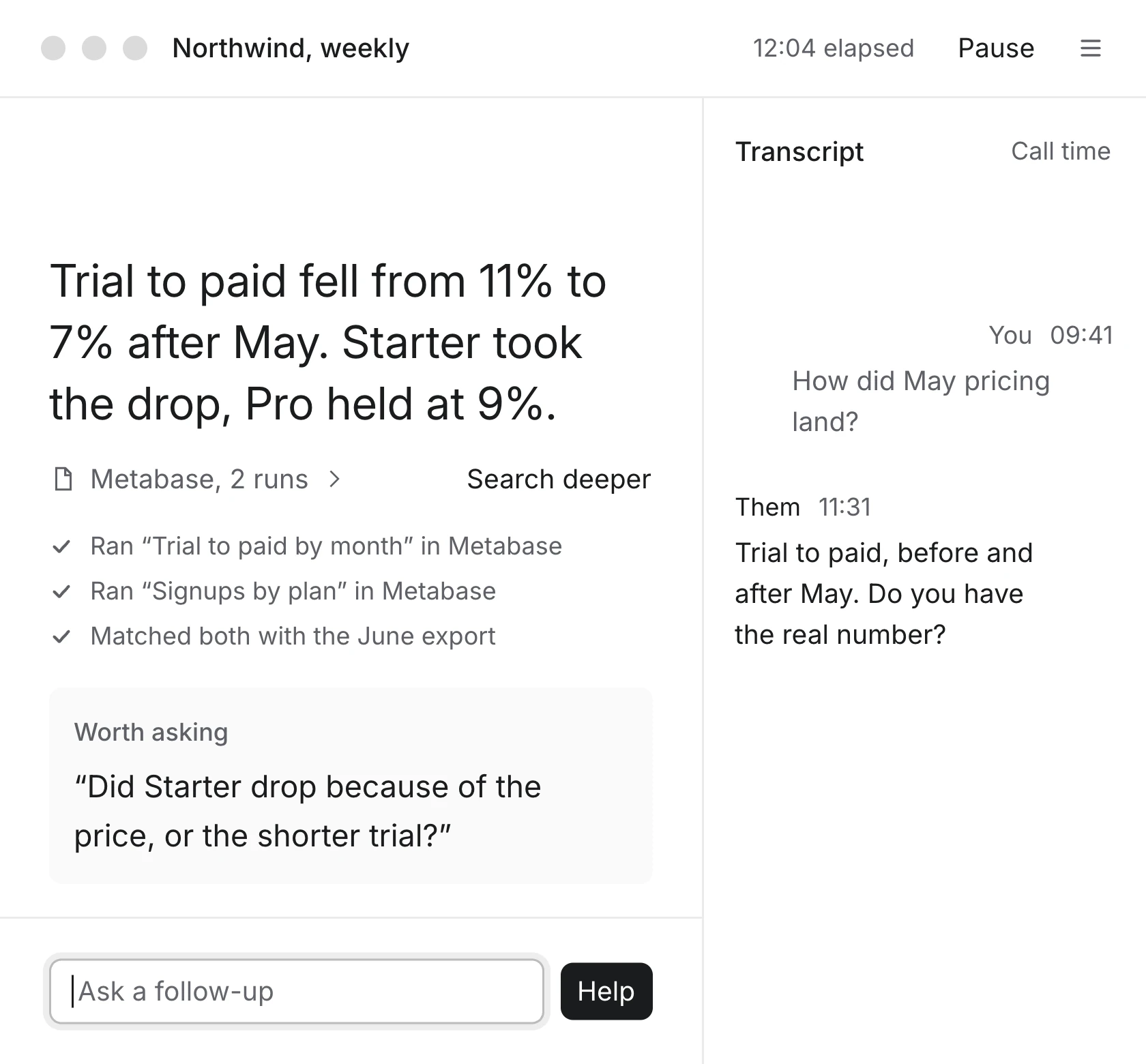
The answers come from Claude, started in the client's folder, so it runs on the account that folder belongs to. On a test call with recorded voices, the suggestion was on screen in less than half a second and the full card with its sources in a bit more than 2 seconds.
After the call I type one command, /file-call. It's a skill, a file of instructions the agent follows step by step (more on skills below).
At the top, the call. It is transcribed twice: by Turn, on my Mac, and by Fireflies. Both go into the command /file-call, which writes 4 things in the client's folder: the call note in calls, the raw export in raw/exports, the follow-ups in TODO.md and the decisions in PROJECT_STATE.md. Then one commit.
I file it because of the memory problem again: if the call only lives in my head and in Fireflies, the next agent doesn't know what was promised, and once it's in the folder, it does. Then I read the note and correct it.
What still sucks: 2 transcripts of the same call don't say the same thing. On the one call where a script compared them word by word, about 1 word in 5 was different. On a call this week, one tool heard that I spend 200 € a month on AI and the other heard 200 € a year, when it's 200 € a month. So I don't take a number from a transcript without checking it with the person who said it. Keeping the transcript in raw tells me where a number came from, but it doesn't make the number right.
I've only used Turn on a handful of real calls. One early transcript got lost because the app quit before anything was saved. It's too early to say if it earns its place.
When I talk instead of typing
I still type most of the time. But for some things talking is just better:
- Brainstorms: when I don't know yet what I want, I think out loud and sort it out afterwards
- In-depth reviews: I look at a page or a document and say everything I see, without stopping to type
- Long briefs: when I type, I cut things short, and when I talk, the agent gets the context, the constraints and what I'm really after
For a short command, a file name or a number, I type.
I dictate with Handy, an open-source app, in my own version with 2 keyboard shortcuts. I press a shortcut, talk, and press again, and it's that easy. Handy turns the audio into text, a language model cleans that text, and the result is pasted where my cursor is. The dictation itself runs entirely on my Mac, with no outside service.
The first shortcut only cleans up: a small model removes the "um" and whatever I started to say and then took back, and it leaves everything else word for word.
What I said, with the hesitations: ok so um on the notes page the titles could be shown a bit better, euh the the top bar feels away, actually no scratch that, make the borders lighter across the website instead. also check that the post pages share the same design system. and uh do you think we should keep the old posts. Under it, what gets pasted after Option and Space, cleaned by a local model in 1.5 seconds: the um, the uh and the abandoned sentence about the top bar are gone, and the rest is word for word.
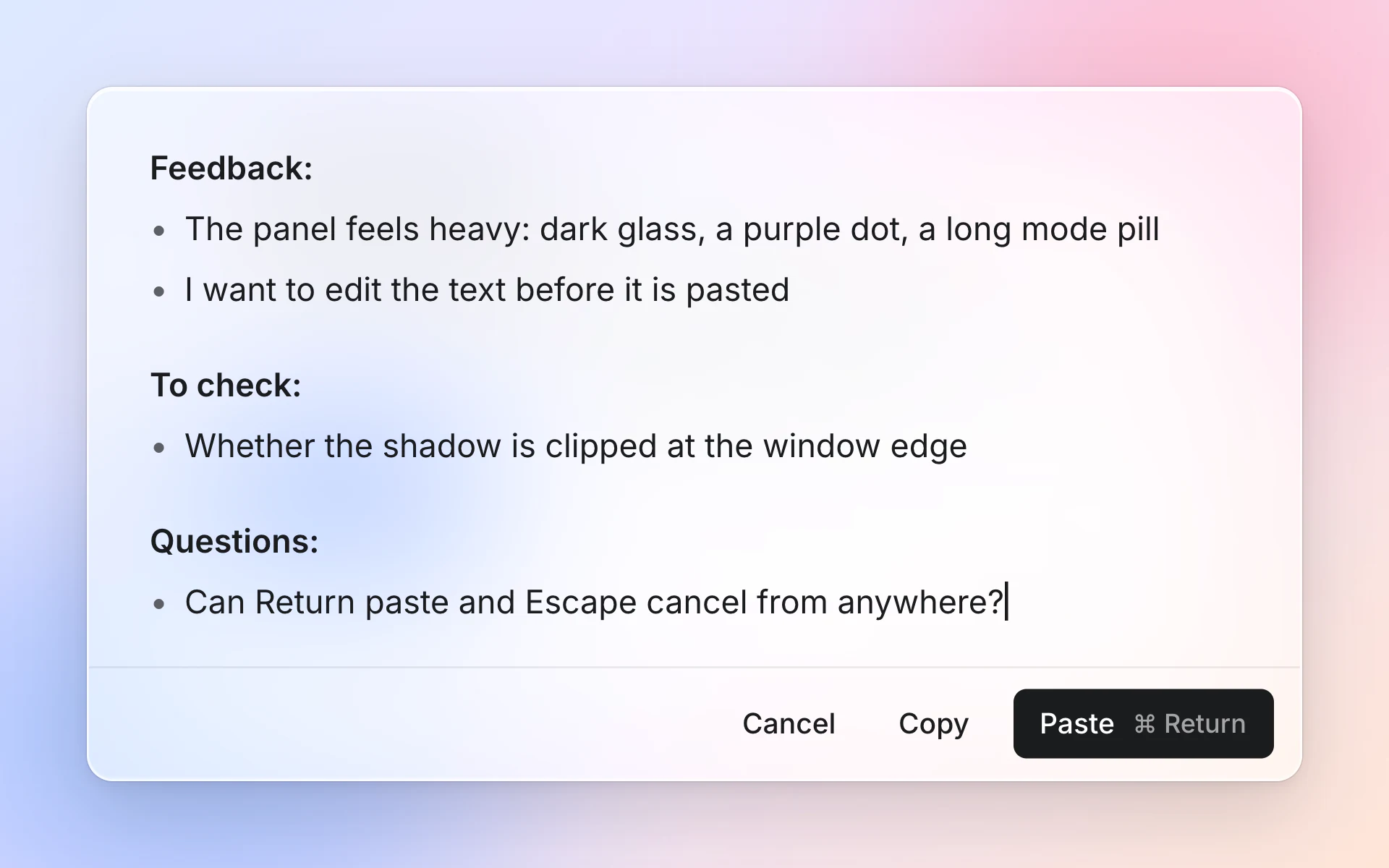
The second shortcut is the one I use for reviews. When I review a page out loud, everything comes out mixed: what I think, what I want checked and what I'm asking. So a bigger model rewrites what I said as a prompt for the agent, sorted into 3 groups: feedback, things to check and questions. With the sentence above, that gives 2 lines of feedback, 1 thing to check and 1 question. It takes longer, 7.8 seconds against 1.5 on that sentence, and it doesn't paste right away. It first opens a small panel where I read the result and fix it if the model got something wrong, and from there I paste it, copy it or cancel.
Screenshots
The other thing I give an agent is screenshots. Most of my feedback is a screenshot and one sentence, because showing is faster than explaining, and the agent sees exactly what I see. This whole site was built that way: I'd paste a screenshot of a page and write something like "the titles could be shown a bit better". Raycast is super helpful here: its clipboard history keeps every screenshot I took, so I can go back and paste one from 10 minutes ago.
The agent does the same thing back. Before it tells me a page is done, it opens it in a browser that runs without a window, takes screenshots at desktop and phone size, and looks at them. To be fair, that doesn't catch everything. It does catch the obvious, like a text that overflows or a section that didn't load.
Memory
Files hold the state of a project. They don't hold what I said 3 weeks ago in a conversation with another agent. And I use several agents, so what I decided with Claude on Monday, Codex has never heard of.
So I built Onadit, as a safety net for the things that never made it into a file. It's a small program that runs in the background on my Mac. Every hour it picks up my new Claude Code and Codex sessions, sorts them and files them in a searchable memory. Conversations from the chat apps, like ChatGPT or Claude, come in through their export files. There are a bit more than 7,000 conversations in it today, and they stay on my Mac. The only thing that leaves is short extracts, sent to a service that turns text into numbers so it can be searched by meaning and not only by exact words.
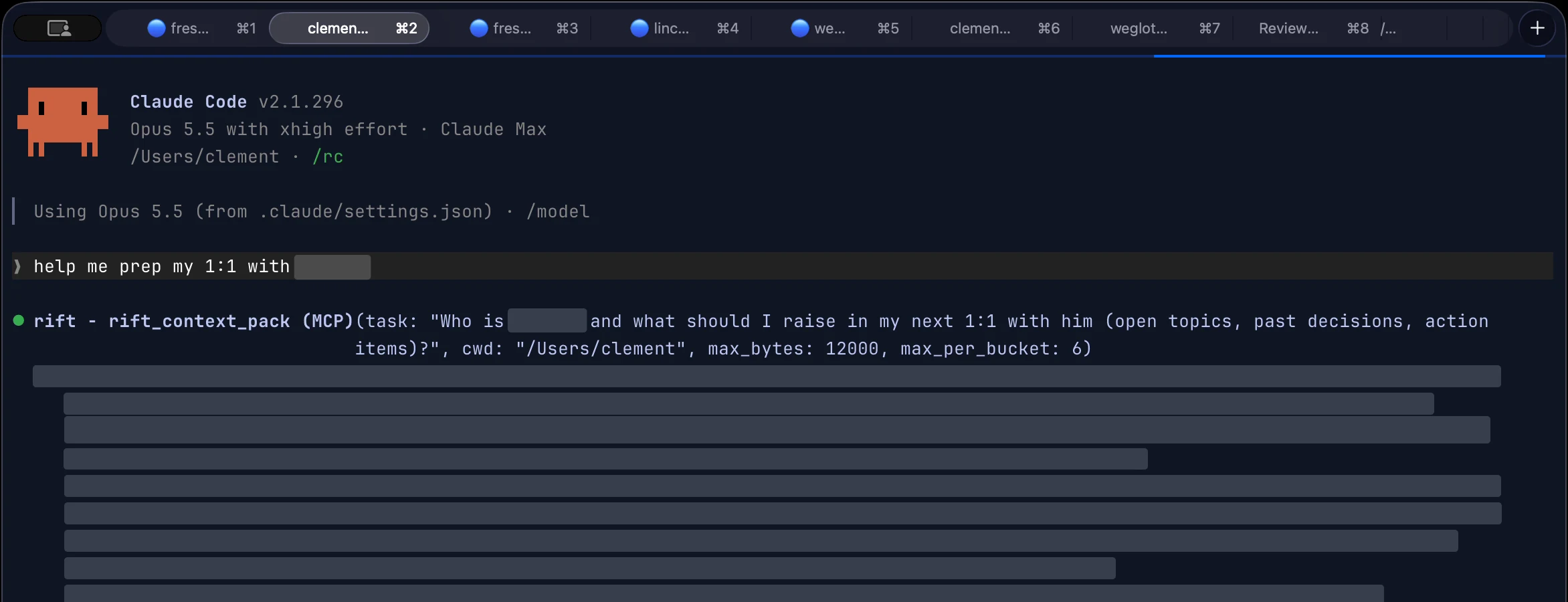
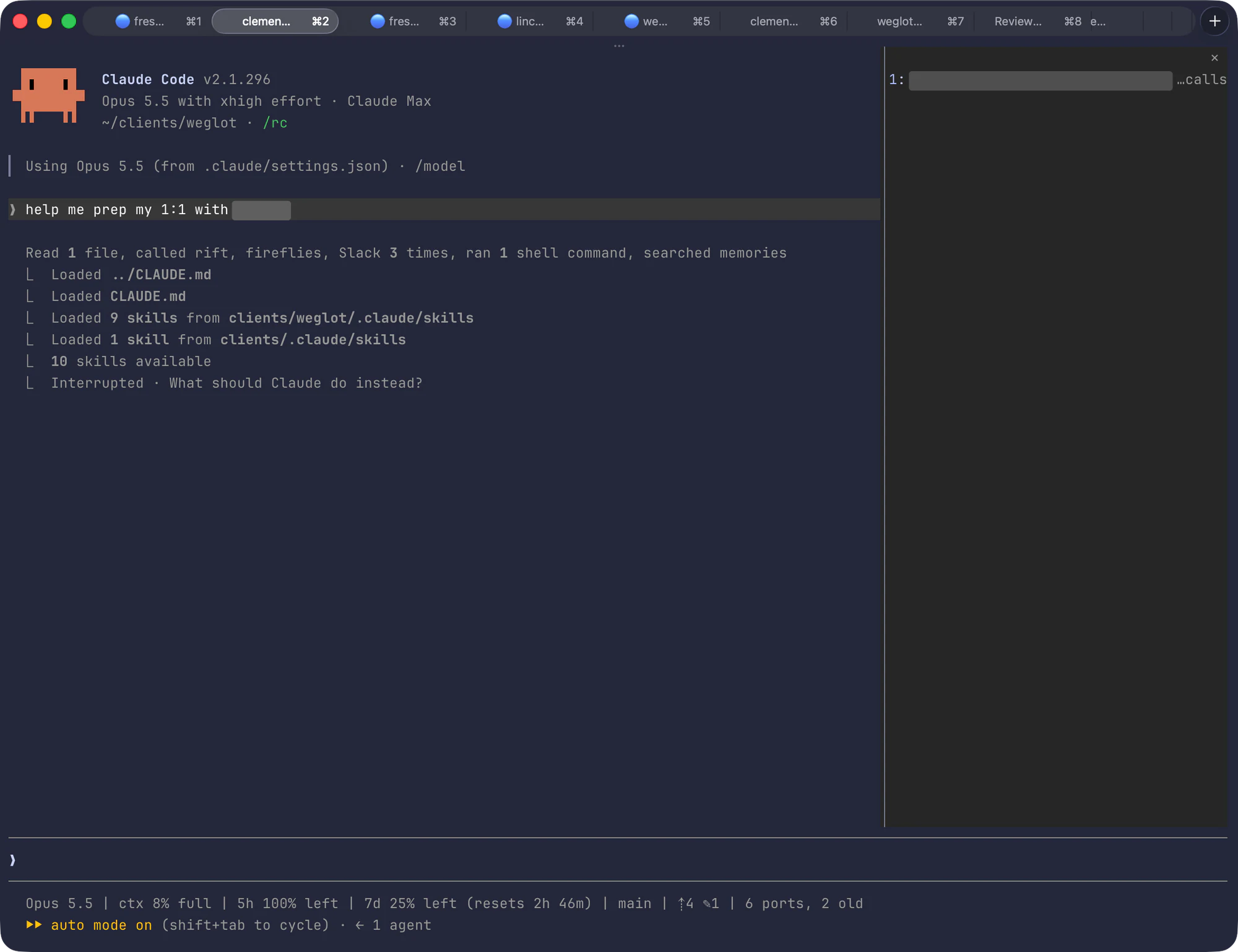
Then Onadit is plugged into the agents as a connector. One line, added at the start of every session, tells the agent to ask Onadit before it decides anything. It doesn't get 7,000 conversations back, because that would drown it. It gets a short pack of a few kilobytes: what I already decided on that subject, the rules I gave, and my own sentences, word for word.
On the left, 3 sources: Claude Code, Codex and the chat apps. Every session is kept in Onadit, which holds more than 7,000 of them. Onadit produces the pack: past decisions, my rules, and what I typed. The pack goes to the agent, before it decides.
In a real session it looks like this: I ask for help to prepare a 1:1, and the first thing the agent does is ask Onadit what it knows.
I'm not the only one on it. About 10 people have used it every day for a few months now, and the feedback has been quite good. Each of them runs their own copy on their own Mac, and I never see their conversations. Reach out if you'd like to try it before I launch and charge :)
Reading what the agents write
Agents write a lot of documents, and a terminal is a bad place to read them: no headings, no tables, one small font. I tried a preview pane next to the conversation, then Obsidian. Obsidian got slow because it was also loading all the code in my folders, more than 400,000 files. Now the documents open in MarkEdit, and the space bar in Finder shows a preview thanks to QLMarkdown.
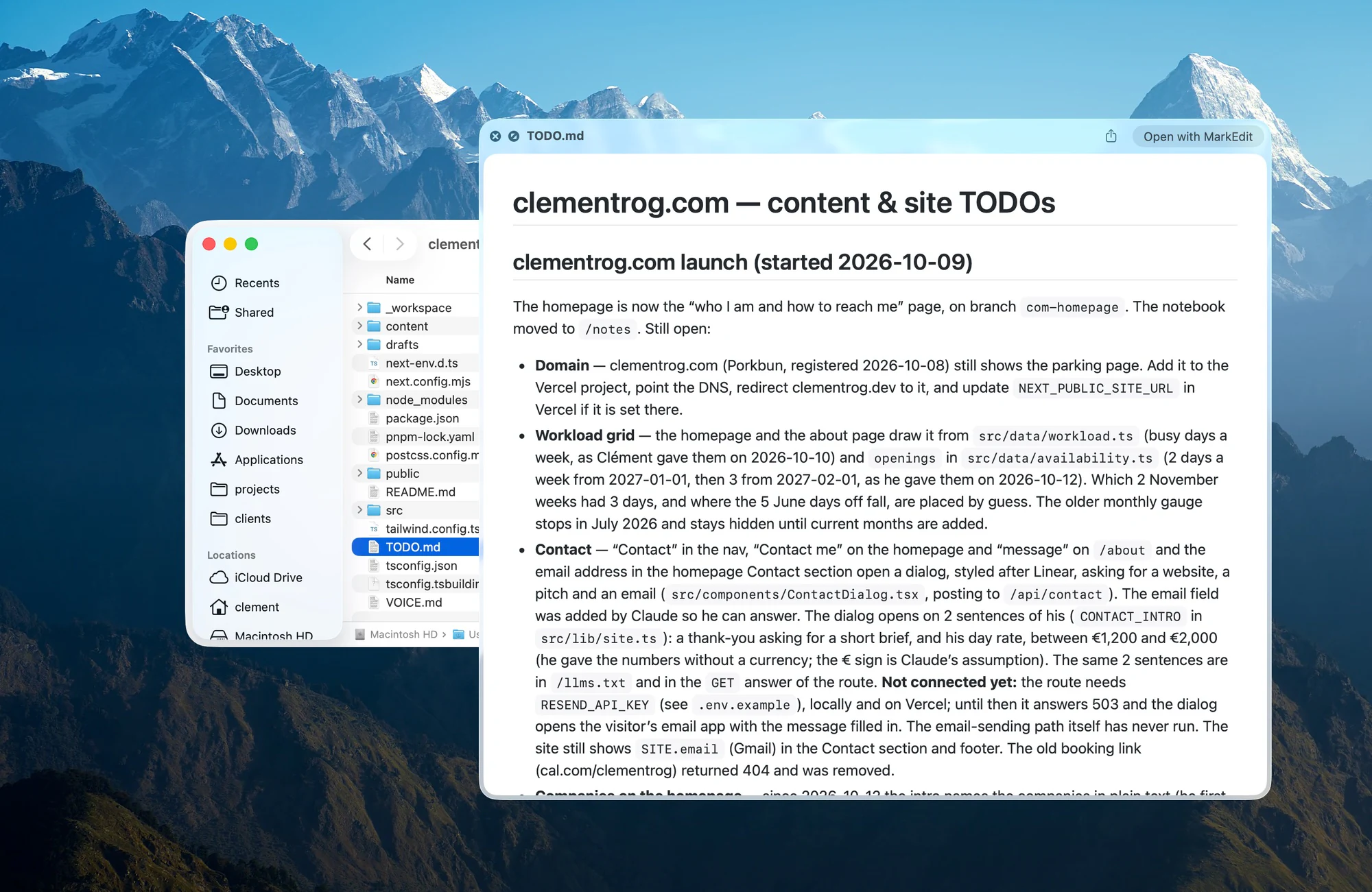
This week I also added a side pane to Claude Code that lists the documents a session read or wrote. I open them by number, without leaving the keyboard.
Cleaning up after the agents
Nobody told me about this part: agents leave things behind.
To test a website, an agent starts a small server on my Mac. When it's done, it often forgets to stop it. One day I counted 10 of them still running, the oldest for 34 days, which was a mess. The same goes for the work itself: more than 20 projects had changes that only existed on my laptop, never sent to GitHub. I was keeping track of all that in my head.
So I had 2 small commands made. ports asks macOS which programs are still listening for connections, shows which project each belongs to, and stops them. unshipped goes through my projects and asks git what was never pushed.
Claude Code lets you put one line of your own under the conversation, so both counts sit there:
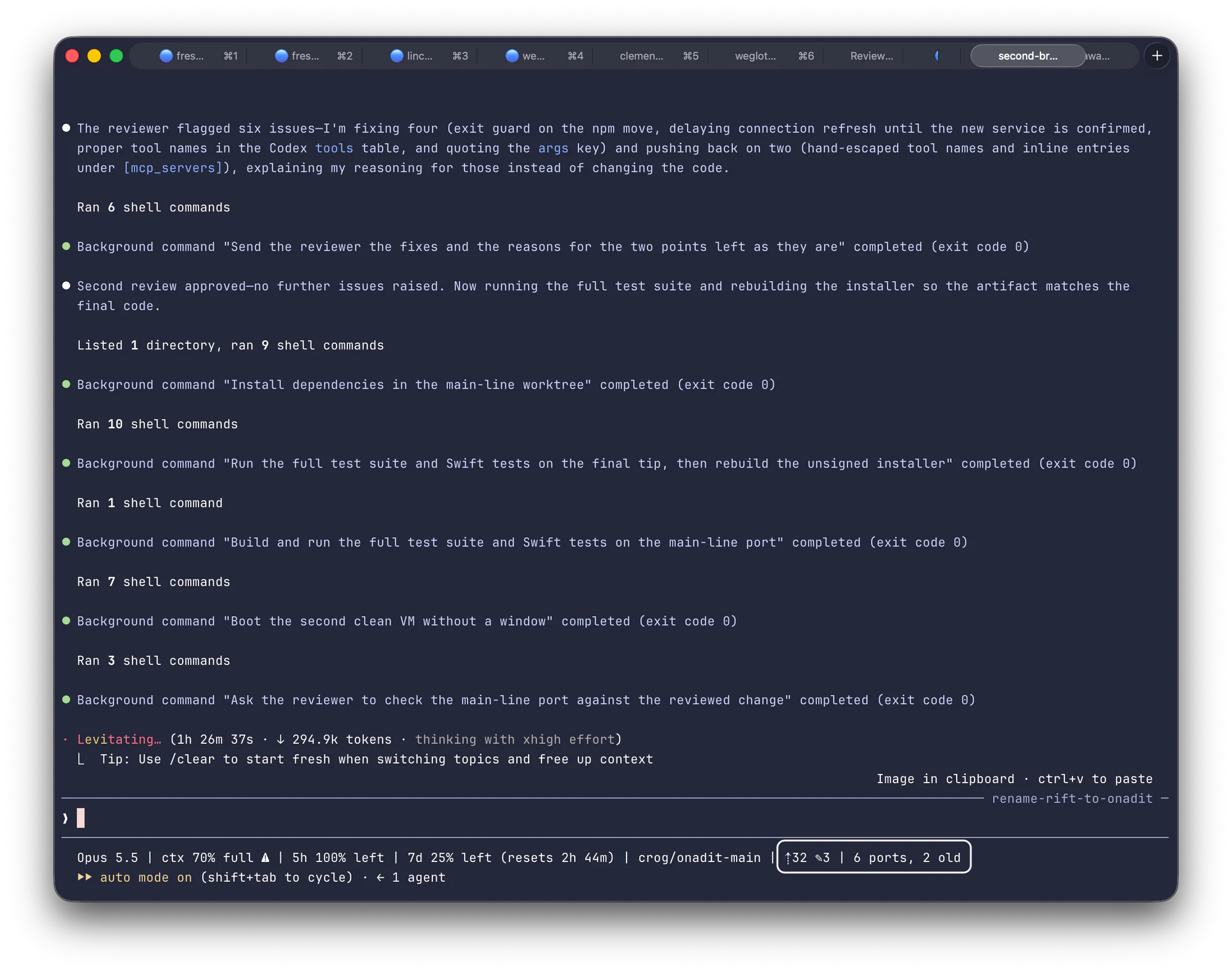
On the left of the same line I keep how full the conversation is, because past half full I start wrapping up, and when my weekly limit resets.
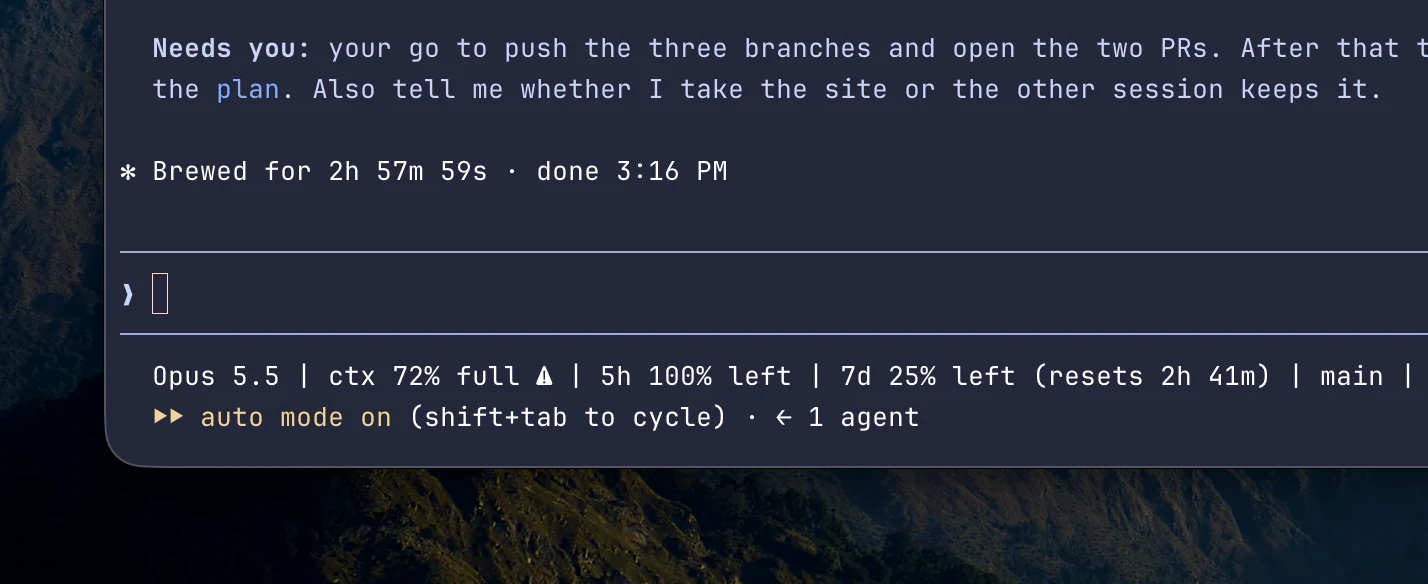
The folders themselves get messy too: documents pile up, a finished todo item stays in the wrong section, an old plan sits next to the current one, and after a few months it's hard to find the right document, for me and for an agent.
So I have what I call the Garden. It's a small program that checks each client folder and counts what drifted: done items left outside the done section, documents with no status line, old documents that belong in the archive, generated files that slipped into git. It fixes nothing by itself and only writes the count in one note, and a leaf in my menu bar shows where each folder stands: clean, a backlog to weed, or something that needs me now. It's supposed to run every hour but, to be real, when I took the screenshot below it hadn't run for 6 days and I hadn't noticed.
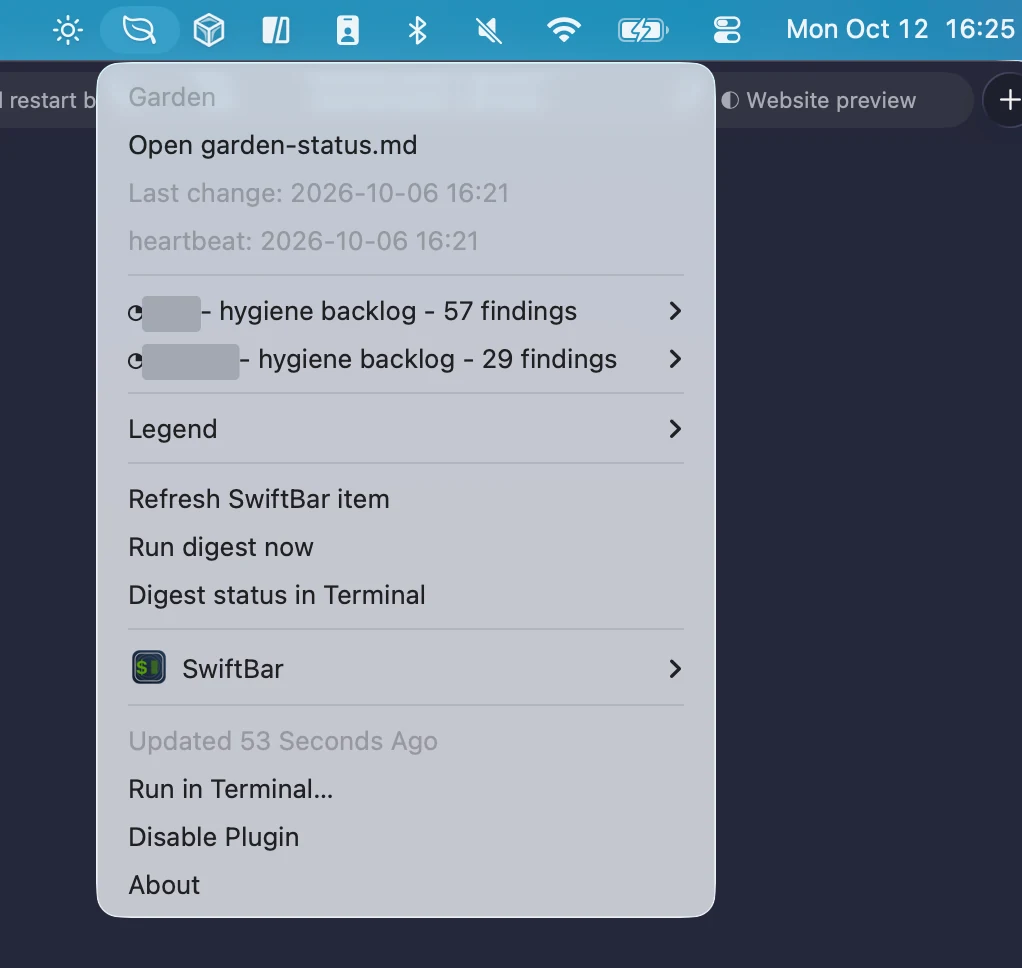
The Garden only reports, so to clear a list I type /triage in that folder and an agent walks me through it, one item at a time.
One more thing I learned the hard way. Agents like to put their working copies in the Mac's temporary folder. A working copy is a second copy of a project, so that 2 agents don't write in the same files. And macOS deletes whatever sits in that folder untouched for 3 days. I found 20 working copies in it, and 2 had already lost most of their files, so nothing lives there anymore.
Skills
A skill is a file of instructions for one kind of job. The agent sees a one-line description of each skill I have. When a task matches, or when I type the skill's name after a slash, it loads the whole file and follows it. That way I explain a job once, and I get it done the same way every time. I have a lot of them, and these are the 5 I'd show.
/product-design: my taste, written down, so what to show, what to hide and how a screen should breathe. It comes from my own iterations, every time I had to correct an agent on a design/design-critic: a way to critique a product that's running, screen after screen. An agent distilled it from recorded critiques by top designers at top companies/weekly-report: pulls the numbers of the week from the tools and says what moved and why. I rewrite the message myself before it goes to the client/file-call: files a call in the client's folder, as shown above/triage: walks me through what the Garden found in a folder, so what's done, what's dead and what goes to the archive. Then it tidies the files
Both agents also read the same short page of rules, whatever the folder. It tells them to make the smallest change that works, to say what they checked and what they assumed, and to end with 4 lines: what I asked, what changed, what was verified, what needs me. Those 4 lines are what I read first.
What I don't use AI for
- Writing, meaning posts, messages to a client, anything with my name on it. I tried many times, and the drafts sound like nobody. This month I threw away 3 drafts of a LinkedIn post and typed it myself
- Copywriting, meaning a headline, a landing page or a positioning. The way I use AI there is to give it a brief and ask for a few directions. From there I rewrite, and I lock things down
- Decisions: an agent prepares the decision, with the numbers, the options and what's missing, and then I decide. Anything about money, the product or something that can't be undone comes back to me. That's a rule they're told to follow, not a lock, and it has failed once (see my way to software engineering)
- Sending, at least for now: for client work, agents draft the emails and I send them. I'm building Juby, an agentic email client, and there agents already send for me, but only personal stuff
- Numbers nobody can trace: if a figure doesn't point to a file in
raw, it doesn't go to a client, and I check that before I send
If you want to copy something
Don't copy all of it, just start with the folders, a raw folder for what comes in, and 2 files per project: a todo and a short note on where the project stands. Add one connector, to the tool you open the most. Add the next one when you notice you keep needing it.
That's the photo for now, and it will look different in a month.
All links
- Terminal and agents: Ghostty, Claude Code, Codex, worktrunk, Raycast
- Apps I looked at and didn't adopt: cmux, Conductor, Agent Deck
- Connectors: MCP, Search Console, Google Analytics, Google Ads, Ahrefs, HubSpot, Notion, Paper, Excalidraw, ComfyUI
- Calls: Fireflies, Claap, whisper.cpp
- Dictation: Handy, Hammerspoon, MLX
- Reading: MarkEdit, QLMarkdown
- Mine: Onadit, plus Juby and Turn, which are not public. Reach out if you want to try one
- The other notes: my way to software engineering, my fine-tuning attempts, my stack